%20--%3e%3csvg%20version='1.1'%20id='Ebene_1'%20xmlns='http://www.w3.org/2000/svg'%20xmlns:xlink='http://www.w3.org/1999/xlink'%20x='0px'%20y='0px'%20viewBox='0%200%201065%20225'%20style='enable-background:new%200%200%201065%20225;'%20xml:space='preserve'%3e%3cstyle%20type='text/css'%3e%20.st0{fill:url(%23SVGID_1_);}%20.st1{fill:%23606060;}%20.st2{fill:url(%23SVGID_2_);}%20.st3{fill:%2358B8C5;}%20.st4{fill:%2380BC49;}%20.st5{fill:%23FFFFFF;}%20.st6{fill:url(%23SVGID_3_);}%20.st7{fill:url(%23SVGID_4_);}%20.st8{fill:url(%23SVGID_5_);}%20.st9{fill:url(%23SVGID_6_);}%20.st10{fill:url(%23SVGID_7_);}%20.st11{fill:url(%23SVGID_8_);}%20.st12{fill:url(%23SVGID_9_);}%20.st13{fill:url(%23SVGID_10_);}%20.st14{fill:url(%23SVGID_11_);}%20%3c/style%3e%3cg%3e%3cpath%20class='st3'%20d='M216.6,222.6c-22.5,0-44.3-5.2-51-6.9c-5.1-1.3-8.2-6.5-6.9-11.7c1.3-5.1,6.6-8.2,11.7-6.9%20c25.1,6.5,67.6,11.1,81.4-3.2c6.4-6.5,9.4-17.2,9-32c-0.6-24.1-0.7-48.9-0.4-75.7l0-0.5c0.7-9.9-3.2-22.5-16.5-25.1l-0.6-0.2%20c-8.8-2.4-18.6-2.6-27.1-2.6c-9.1,0.3-32.8,1-35.3-27.6c-1.5-6-4.1-8.8-14-8.8H142c0,0,0,0-0.1,0l-27.1,0%20c-10.8-0.2-11.4,2.2-13.8,11c-2.1,7.5-4.9,17.7-16.7,23L83.4,56l-0.9,0.2c-7.2,1.7-14.2,1.7-21,1.8c-6.1,0.1-12,0.1-17.2,1.4%20l-0.7,0.2l-0.7,0.1c-19.3,1.6-22.6,17-22.1,29.6l0,0.2c0.6,25.3,0.6,50.7,0.6,72.6c0,29,10.9,36.1,20.4,39c6.5,2,14.1,1.8,21.4,1.7%20c15.5-0.3,31.6-0.6,46.6-4.9c24.5-7,71.3-38.5,86.1-61.4c10.3-21.8,3-36.3-6.4-42c-10.5-6.4-27.3-4.6-41.1,13.9l-7.5,10.1l-7.7-10%20C122.6,94.6,110,88.4,98.5,91.4c-9,2.3-15.6,9.9-17.2,20c-3.1,19,11.6,40.9,39.3,58.5c4.5,2.8,5.8,8.7,2.9,13.2%20c-2.8,4.5-8.7,5.8-13.2,2.9c-49.4-31.5-50-64.8-47.9-77.7C65.3,90.6,77.3,77,93.8,72.8c15.9-4.1,32.9,1.6,46.9,15.2%20c19.7-19.3,43.4-19.3,58.7-10c17.7,10.7,28.7,35.7,13.5,67.2l-0.5,0.9c-17.2,27.3-68.8,61.9-97.4,70.1c-17.3,4.9-35.4,5.3-51.4,5.6%20c-8.4,0.2-17.9,0.4-27.4-2.5c-22.5-6.9-34-26.2-33.9-57.3c0-21.7,0-47-0.6-72C0.4,61.9,15.3,43,40.5,40.6%20c7.1-1.6,14.1-1.7,20.8-1.7c5.6-0.1,10.9-0.1,15.8-1.1c2.7-1.6,3.7-4.3,5.4-10.3c2.6-9.5,6.9-25.3,32.4-25l51.9,0%20c18.2,0,29.2,8.2,32.8,24.3l0.2,0.7l0.1,0.7c0.6,8.5,2,11.2,15.8,10.7l0.3,0c9.7,0,21,0.2,32.1,3.1c20.4,4.2,33.1,22.2,31.6,44.9%20c-0.4,26.4-0.3,50.8,0.4,74.6c0.5,20.2-4.3,35.6-14.5,45.8C254,219.1,235.1,222.6,216.6,222.6z%20M141.2,34.1%20c-8.5,0-15.4,6.9-15.4,15.4S132.7,65,141.2,65c8.5,0,15.4-6.9,15.4-15.4S149.7,34.1,141.2,34.1z'/%3e%3cg%3e%3cpath%20class='st1'%20d='M387.2,200.5V59.1h21.1v141.4H387.2z'/%3e%3cpath%20class='st1'%20d='M510.4,59.1h30.3l44.8,92.9h-2l44.8-92.9h29.3v141.4h-21.3V82.3h3.4l-48.4,101.5h-13.9L529.4,82.8h2.1v117.7%20h-21.1V59.1z'/%3e%3cpath%20class='st1'%20d='M759.8,200.5V59.1h21.1v141.4H759.8z'/%3e%3cpath%20class='st1'%20d='M868.8,193.9v-21.4c5.5,3.4,11,6,16.4,7.7c5.4,1.7,10.6,2.6,15.5,2.6c7.1,0,12.2-2.1,15.4-6.3%20c3.1-4.2,4.7-10.3,4.7-18.3V59.1H942v99.1c0,10.7-1.6,19.4-4.9,26c-3.3,6.6-7.9,11.5-13.9,14.5c-6,3.1-12.9,4.6-20.8,4.6%20c-6.2,0-12.1-0.9-17.6-2.7C879.1,198.9,873.8,196.7,868.8,193.9z'/%3e%3cpath%20class='st1'%20d='M1042.3,200.5V59.1h21.1v141.4H1042.3z'/%3e%3c/g%3e%3c/g%3e%3c/svg%3e)
Livestream
coming soon
The evening, live on the big screen
As soon as a guest uploads a photo, it appears in the stream — on the projector in the hall, on the TV by the bar, on every phone in the room. Individual snapshots become one shared picture, seen by everyone while the party is still going.
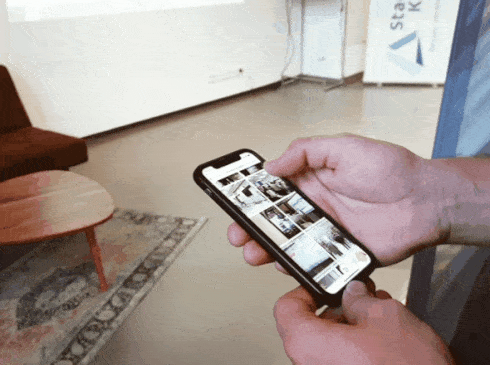
On the big screen in three steps
No technician, no software, no box of cables. All you need is a device with a browser and a connection to the projector.
- 01
Open the album
Start the livestream from the album — on a laptop, tablet, or right in the browser on a smart TV.
- 02
Onto the screen
Send the screen to the projector or TV via HDMI, AirPlay or Chromecast. Full screen, nothing else.
- 03
Guests take photos
Every photo a guest uploads appears in the running stream within seconds.
What the livestream can do
The stream isn't a separate product — it's a view of your album. Everything that plays in it is kept afterwards.
Real time
New photos slot in automatically — no reloading, no one needing to sit at a computer.
No app
The stream runs in the browser. Guests upload via their link, nothing more is needed.
Full-screen mode
No menus, no toolbars. Just your photos, in a grid or as large single views.
Moderatable
You decide which tags and chapters play in the stream and can hide individual photos.
On any device
Projector, TV, a tablet at the reception, or the phone in your hand — the same view.
Nothing is lost
Whatever ran in the stream stays in the album afterwards, in original resolution.
Where the stream shines
It works best where many people are taking photos at once — and everyone wants to see what the others just captured.
Wedding reception
Between dinner and the dance floor, ceremony photos already play on the big screen.
Cocktail reception
A tablet on a standing table shows what's happening inside and outside at the same time.
Birthday party
The living-room TV becomes the photo gallery of the evening.
Company party
Large venues, many guests: the stream connects every corner of the event.
You can find more details on all features on the Features page, or under How it works.
Let your evening go live
Create an album, invite guests, open the stream. Start for free, no commitment.